
Steps for Viewing Balance Sheet in Tally with all Schedule and for Print.

Steps for viewing Balance sheet in Tally with all schedule and for Print.

Here is the Some steps for Viewing complete balance sheet in Tally with Schedule of each accounts.

1) Open Tally Company.
                                            You can see Gateway of Tally: 
2) Go to balance sheet and enter or press "B" Key.
        (Also you can change current period with press Alt+f2 key on Gateway of tally, which you want to see or print Balance sheet)


3) After Enter Balance Sheet or Press B Key, you can see this type of window.

        Click Detailed Tab available on top of right side of window or press Alt + F1.


You can see Balance sheet with full schedule details.


 Same as for other Account.
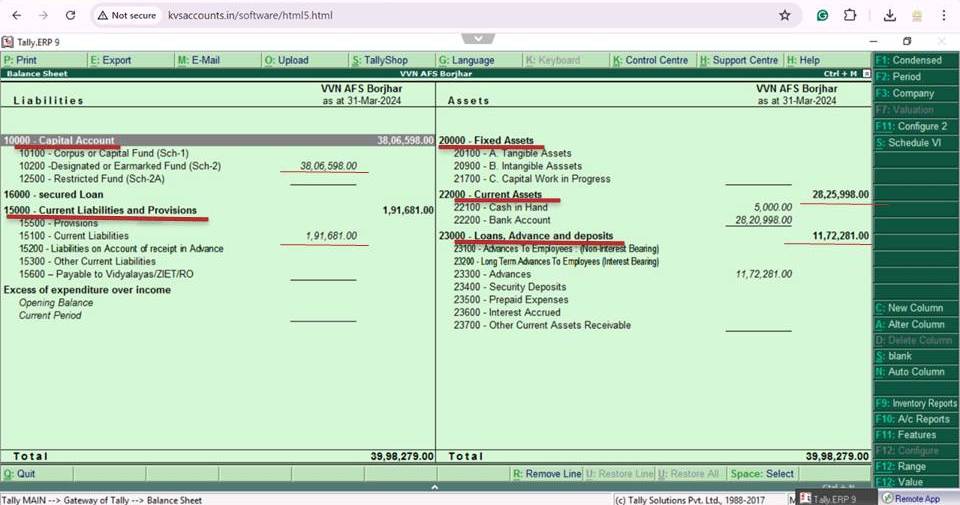


You Can also print with click of tap available on top of left side of window.


I hope so it help for preparing of Annual Account from Tally.


Comments

Popular posts from this blog

Previous Year Question paper for KVS Exam (Section officer, Finance officer, ASO, SSA and JSA)

 Previous Year Question paper for KVS Exam (Section officer, Finance officer, ASO, SSA and JSA) Recently Kendriya Vidyalaya Sangathan announced Recruitment for Teaching and Non Teaching post. Click Here for Advertisement of Teaching and Non Teaching post of KVS . Click Here for Advertisement of PRT Recruitment Details. Click Here for details of full Syllabus of all post. For the better preparation it should be known about it question pattern and paper. Here is the some previous Question Paper for Non teaching post:  Section officer, Finance officer, ASO, SSA and JSA Click Here for Question paper of Section officer. Click Here for Question paper of Finance officer. Click Here for Question paper of  Assistant Section Officer (ASO). Click Here for Question paper of Senior Secretariat Assistant (SSA) 1  Click Here for Question paper of Senior Secretariat Assistant (SSA)  2  Click Here for Question paper of Junior Secretariat Assistant (JSA) 1 Click Here for Que...

ADVERTISEMENT NO. 15/2022 - Direct Recruitment of Officers, Teaching and Non-Teaching Staff in Kendriya Vidyalaya Sangathan

 Kendriya Vidyalya Announce Direct Recruitment of Officers, Teaching and Non-Teaching Staff in Kendriya Vidyalaya Sangathan. ADVERTISMENT NO. 15/2022 Kendriya Vidyalaya Sangathan (KVS), henceforth mentioned as KVS, is an Autonomous Organization under the Ministry of Education, Department of School Education & Literacy, Government of India. It has its Headquarters office at New Delhi, 25 Regional offices located at Agra, Ahmedabad, Bengaluru, Bhopal, Bhubaneswar, Chandigarh, Chennai, Dehradun, Delhi, Ernakulam, Gurgaon, Guwahati, Hyderabad, Jabalpur, Jaipur, Jammu, Kolkatta, Lucknow, Mumbai, Patna, Raipur, Ranchi, Silchar, Tinsukia, Varanasi and 1252 Kendriya Vidyalayas (KVs) functioning all over the country including 03 abroad. It also has five Zonal Institutes of Education & Training (ZIETs). KVs are co-educational schools upto class 12thand focuses on holistic development of students.  KVS invites applications from Indian Citizens for filling up the posts of Assistan...

NOC for obtaining Passport and Going Abroad/Foreign Tour in KVS_ Revised Format

NOC for obtaining of passport and going abroad by the officers/employees of Kendriya Vidyalaya Sangathan in the revised format. With reference to O.M.s issued by the Department of Personnel and Training, Ministry of Personnel, Public and Pensions & Ministry of External Affairs, Government of India on the above subject, "No Objection Certificate" for obtaining/renewal of passport and going abroad have been revised with the approval of the Competent Authority of Kendriya Vidyalaya Sangathan. Click Here for More details and Proforma in English and Hindi as Pdf. Click Here for More details and Proforma in English and Hindi as Pdf. Accordingly two revised formats are being attached. The employees of Kendriya Vidyalayas/Regional Office working under your jurisdiction to apply for "No Objection Certificate" through proper channel only by filling complete information in the attached revised format from the date of issue of this letter. Application received in old format...